
SceneConnector
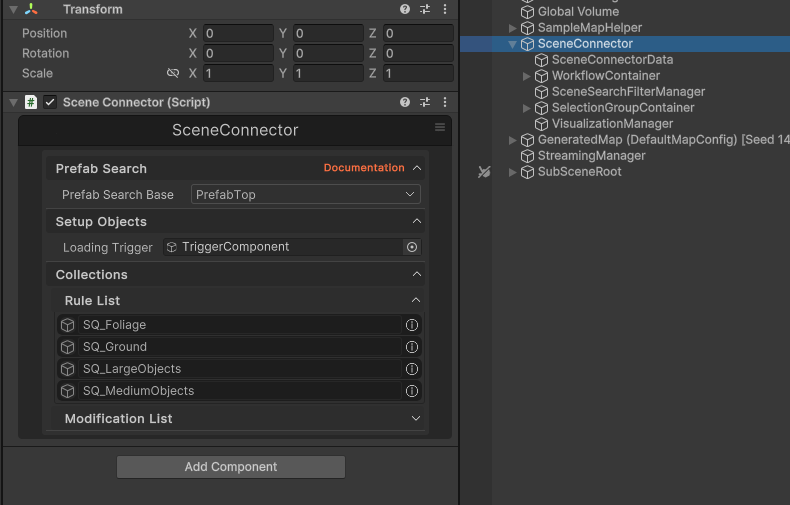
The SceneConnector is a component that is used as the main connecting point for the ProStream systems.
INFO
Note: SceneConnector is automatically created when you click "Setup Current Scene For ProStream" in the ProStream Editor. Do not manually create this component.
See ProStream Editor for setup instructions.
Loading Trigger
The Loading Trigger position value is used to determine when a SubScene (and layers) loads and unloads from the world. While it is not necessary for the Loading Trigger to be a Player Character (it can be a Camera, NPC Object, etc) it is necessary for the loading system to operate properly.
INFO
If this field is left empty, when the system starts, it will attempt to locate and use Camera.main as the Loading Trigger.
Search Filter
When the Search Filter field is populated, and the RuleEngine Match system runs, matches are restricted to child GameObjects of the Search Filter GameObject.
WARNING
If no GameObjects are assigned to the Search Filter list, the system will attempt to match against all GameObjects in the hierarchy.
This is typically undesired as this could include Cameras, Lighting, Light Probes, etc, and any number of things that you might wish to keep in the main parent scene.
Component Structure
The SceneConnector GameObject contains several child components:
SceneConnectorData
Stores data and references for the SceneConnector.
WorkflowContainer
Manages workflow state and process execution.
SceneSearchFilterManager
Coordinates all Scene Search Filters in the scene.
SelectionGroupContainer
Manages object selection groups for organization.
VisualizationManager
Handles visualizations (e.g. Loading Distance Range, etc)
See Also
- ProStream Editor - How to set up scenes
- Scene Search Filter - Define processing scope
- Runtime Streaming - How streaming works at runtime