
Setup
INFO
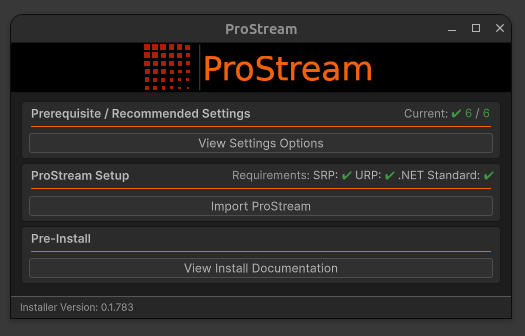
Upon first importing the ProStream package, the ProStream setup window appears automatically.
Editor Requirements
Requirements
Before you start, make sure that you have the following:
- The primary requirements of ProStream are that of the Data Oriented Technology Stack (DOTS/ECS)
- Unity 2022.3.0f1 or later (Unity 6.4 is recommended)
- Scriptable Render Pipeline (SRP) installed and configured (URP or HDRP)
- Any additional requirements as specified by the DOTS/ECS packages for your Editor version or target platform
Additional Requirements and Recommendations
- API Compatibility Level set to .Net Standard (required)
- Scene GameObjects which are to be converted to Entities need to be Prefabs
- (Recommended) Scene Prefabs are children of an Empty Root-Level Parent GameObject
INFO
Newer versions of Unity have both API Compatibility Level and Editor API Compatibility Level settings.
Recommended Project Settings
To take full advantage of ProStream and the Data Oriented Technology Stack, it is recommended to use the following settings:
| Setting | Value |
|---|---|
| Scripting Backend | IL2CPP |
| API Compatibility Level | .Net Standard 2(.1) |
| Graphics APIs | Vulkan, Metal, or DX11/12 |
| Incremental GC (Garbage Collection) | Enabled |
:::
1) Open the ProStream Setup Window
Upon first importing the ProStream package (or when updating), the ProStream setup window will appear automatically.
TIP
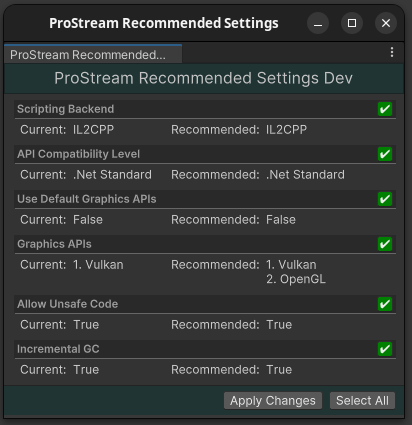
For optimal performance, use the settings described above. These settings can be automatically applied in the Setup Assistant window.
2) Apply Prerequisite Settings
Press the View Settings Options button to show the Setup Assistant window to apply required and recommended project changes.
3) Import ProStream
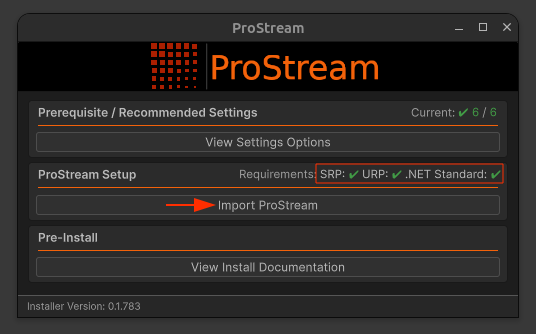
If an appropriate SRP (URP/HDRP) is installed, press the Import ProStream button to begin installing the necessary dependencies and files.
SRP Requirement
An appropriate Scriptable Render Pipeline (URP or HDRP) must be installed before ProStream can be installed.
Why a setup process?
ProStream is designed to be installed as a proper package in order to ensure proper dependency installation and management and will not show up in your Assets/ folder.
The purpose of the setup process is to ensure that the package is installed to the correct location and that the necessary dependencies are installed.
TIP
The setup process can also be accessed by navigating to Tools > instance.id > ProStream > (Setup/Update) ProStream